πŸ”
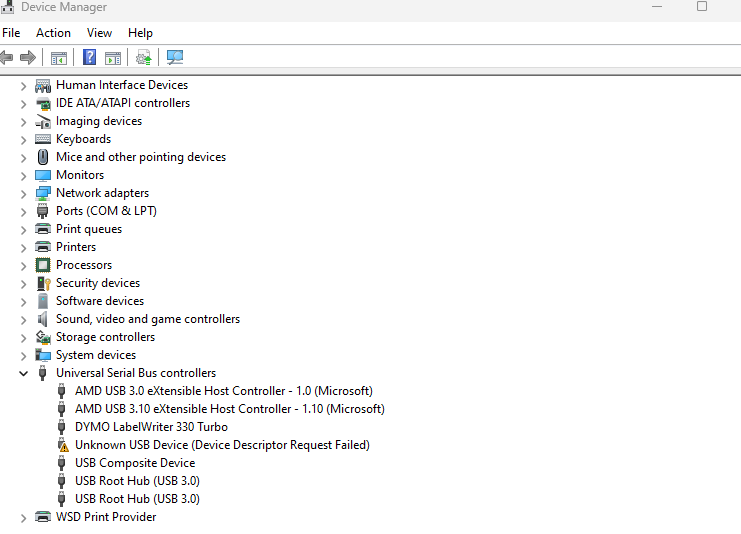
Yaesu FT5 Unknown USB Device (Device descriptor Request Failed)
I have seen a few people getting the dreaded Unknown USB Device (Device descriptor Request Failed) error when connecting their Yaesu FT5 to their PC. I should start by saying the supplied USB cable (Y…

I have seen a few people getting the dreaded Unknown USB Device (Device descriptor Request Failed) error when connecting their Yaesu FT5 to their PC. I should start by saying the supplied USB cable (YAESU SBR-36-MU) is for FIRMWARE updates ONLY. You will still need the SCU-57 for programming the radio. The PL2303 driver is also for the SCU-57. If you want to program the radio without the SCU-57 you will need to use an SD card.

Firmware update steps:

  1. Remove the battery from the radio.
  2. Move the switch on the back of the radio to the "Update" position.
  3. Plug the USB cable into the radio and your PC.
  4. Install the drivers (they are on the Yaesu website).
  5. Connect the power to the radio.
  6. When you are in the firmware update mode you will see the update screen, open the firmware update software. You can ignore COM port and Baud rate settings β€” just run UPDATE.
  7. Wait. The software will look like it is not doing anything at first but it is. Wait a good couple of minutes and you will see it start to update.
  8. When it is done, you're finished.

The manual is as unhelpful as ever, but hopefully these steps help you get your FT5 updated. Good luck!


Acom control cables for some common radios
Acom Amplifier Interface Cables: Band Data and PTT Leads for Yaesu, Icom and Flex Radios An Acom linear amplifier needs two things from your radio: a PTT (keying) line so it knows when to transmit, an…

Acom Amplifier Interface Cables: Band Data and PTT Leads for Yaesu, Icom and Flex Radios

An Acom linear amplifier needs two things from your radio: a PTT (keying) line so it knows when to transmit, and band data so it picks the right filters. Here are the cables I've built to connect Acom amps to Yaesu, Icom and Flex radios, each with its wiring diagram. Test before you put full power through anything.

What the cable has to do

SignalPurpose
PTT / keyingTells the amplifier to switch from receive to transmit.
Band dataTells the amplifier which band the radio is on, so it switches filters for you.
Ground / screenA common reference. Use screened cable to keep RF out of the control lines.

Acom 1200S to Yaesu FTDX-5000: PTT and band data

This lead uses 5-core screened 22 AWG cable (2547 type). It joins the Acom's 15-way D-sub to the Yaesu's 8-pin DIN band data socket. The pin names come from the Acom rear-panel connector and the radio's band data connector.
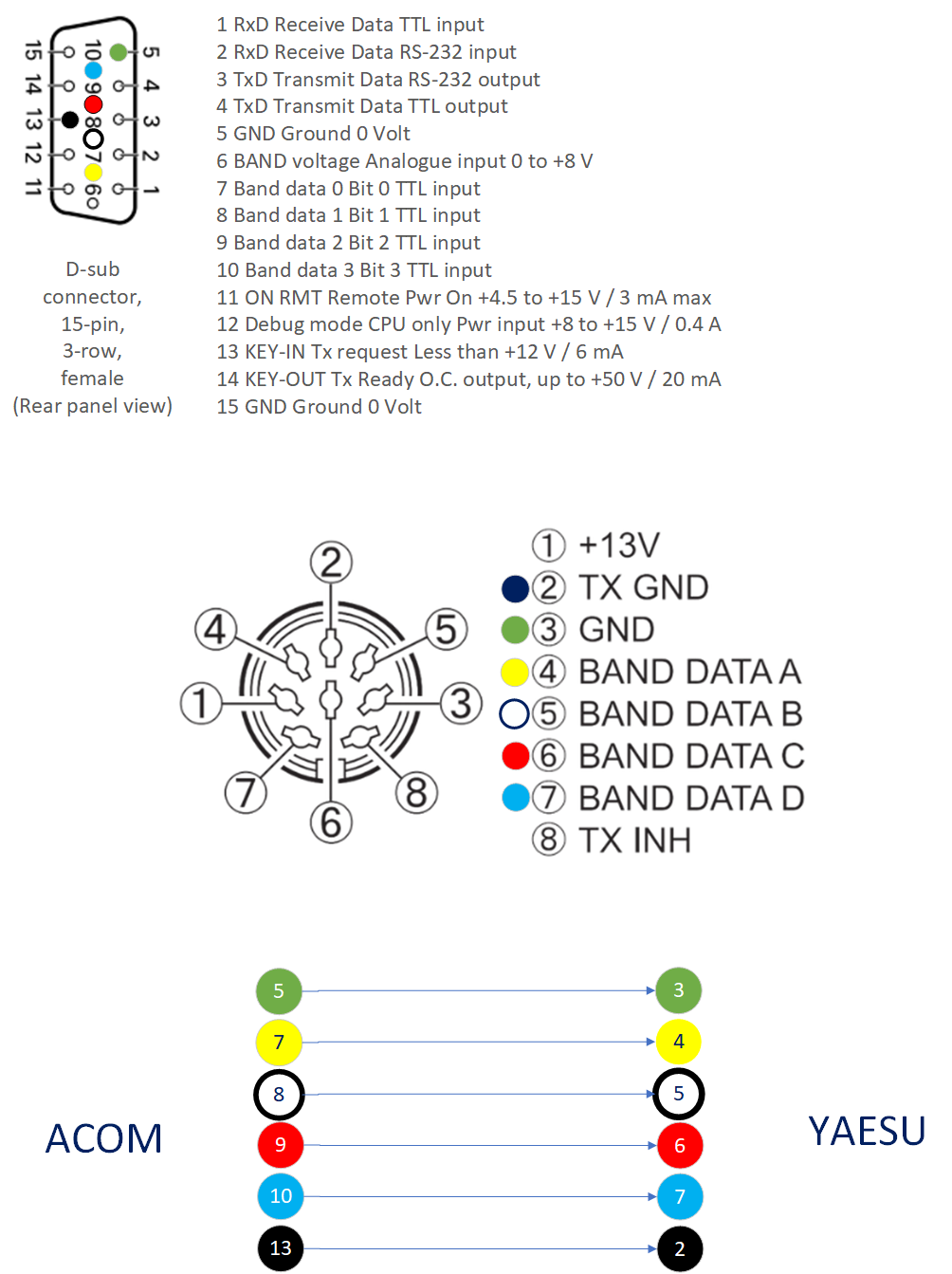
Acom 1200S to Yaesu FTDX-5000 wiring diagram

Acom 15-way D-subSignalYaesu 8-pin DIN
5Ground3 (GND)
7Band data 04 (Band data A)
8Band data 15 (Band data B)
9Band data 26 (Band data C)
10Band data 37 (Band data D)
13KEY-IN (Tx request)2 (TX GND)

The Acom's KEY-IN is rated for less than +12 V at 6 mA, so all the radio has to do is pull it to ground. Connect the cable screen to ground at one end only.

The cable I used is 5-core screened 22 AWG 2547, available here.

Yaesu FTDX-10 and other Yaesu radios: a simple PTT cable

If all you need is to key the amplifier, this is the easy one. The diagram shows an FTDX-10 connected to an Acom 700S with a Yaesu SCU-28 cable from the radio's ACC socket. The other end goes to a phono plug that plugs into the amp's KEY IN socket.
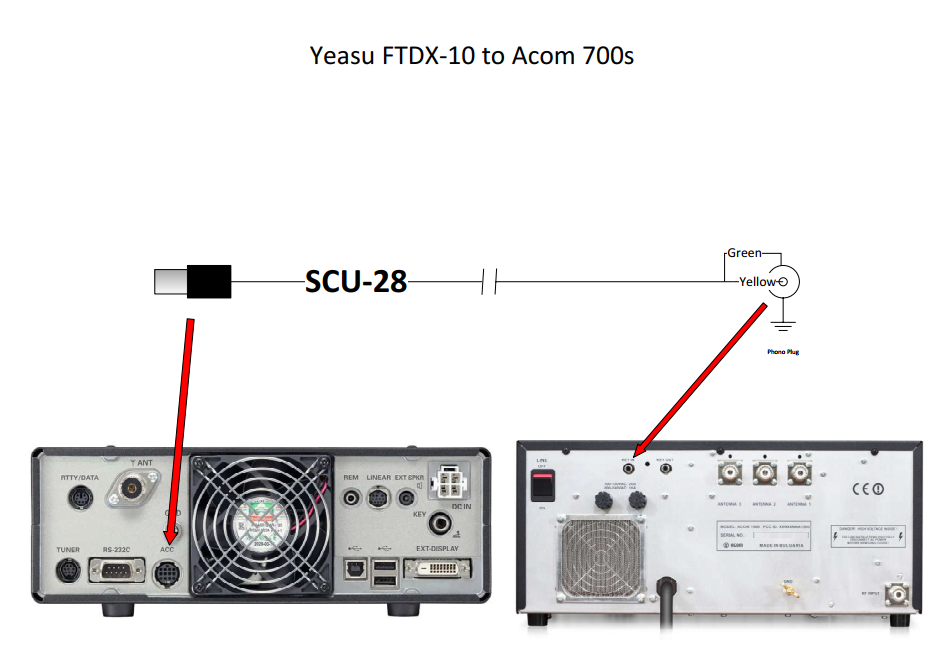
Yaesu FTDX-10 to Acom 700S PTT cable

The thing to watch is the current limit on the radio's keying output. Don't exceed it on the FT-450, FT-450D, FT-950, FTDX-10 or FTDX-1200. The Acom's KEY-IN only draws a few milliamps (6 mA on the 1200S), but check your radio's limit before you hang anything else on the same line.

Icom to Acom: band data and PTT

The Acom end is a 15-way D-sub. The Icom end is two connectors: an 8-pin DIN (ACC1) for PTT and a 3.5 mm mono jack plug for the data connection.
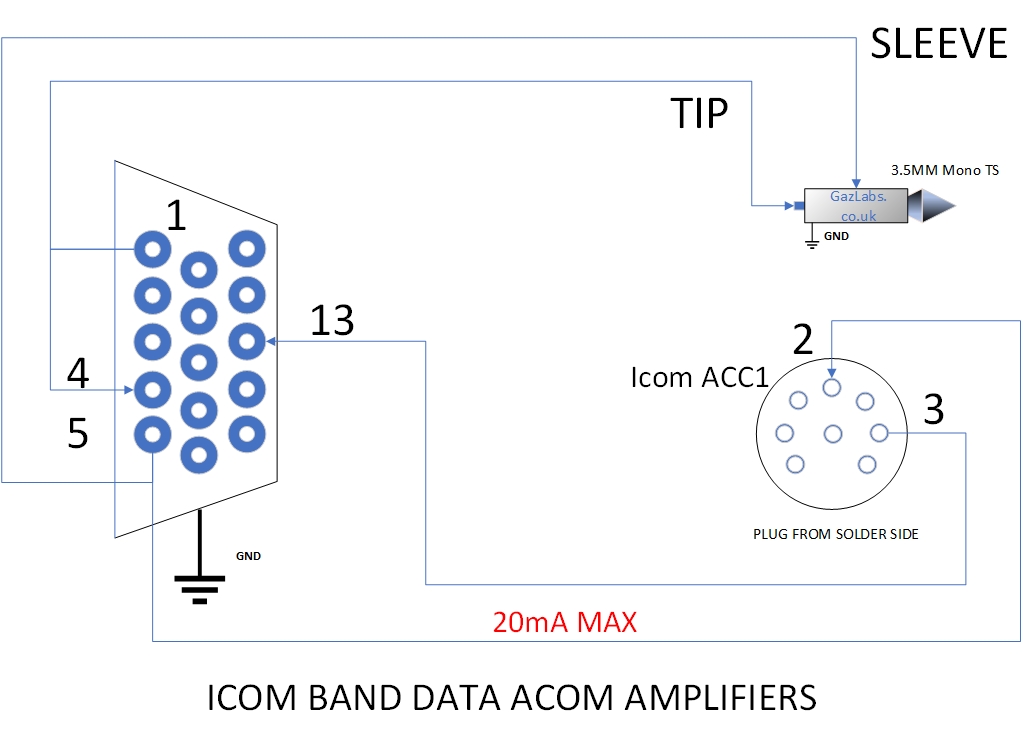
Icom band data and PTT cable to Acom amplifier

Acom 15-way D-subGoes to
13 (KEY-IN)Icom ACC1 pin 3 (PTT)
5 (Ground)Icom ACC1 pin 2 (ground), and the sleeve of the 3.5 mm plug
1 and 4 (data in and out)Tip of the 3.5 mm mono plug

Keep the PTT line to 20 mA maximum. Pins 1 and 4 are joined at the tip so the amplifier can read the radio over a single data wire.

Flex Radio FLEX-ACC-8P-TRS microphone cable

A small cable for the Flex 8-pin microphone socket, with a 3.5 mm TRS plug for the mic and a phono plug for PTT.
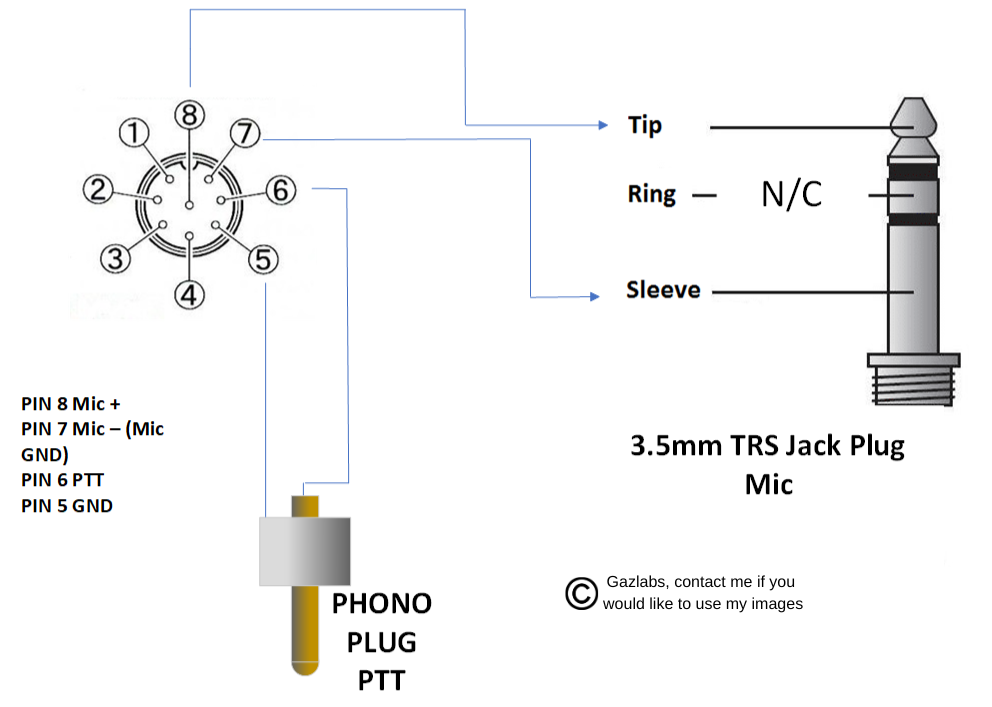
Flex Radio 8-pin to 3.5 mm TRS microphone cable schematic

Flex 8-pin pinSignalGoes to
8Mic +Tip of the 3.5 mm TRS plug
7Mic – (mic ground)Sleeve of the 3.5 mm TRS plug
6PTTCentre of the phono plug
5GroundOuter (sleeve) of the phono plug
–Not usedRing of the 3.5 mm TRS plug

Build and test checklist

  1. Check the pinouts against the manuals for both the radio and the amplifier before you pick up the soldering iron.
  2. Use screened cable and keep the control leads short and away from the antenna feed.
  3. Test the PTT with a multimeter before connecting the amp. The radio should only close the line when it's transmitting.
  4. Check the keying voltage and current against the radio's limits.
  5. Do your first transmit into a dummy load at low power with the amp in standby, then step the power up.

Quick question

Do I need band data as well as PTT? No, PTT alone will key the amplifier. Band data just saves you changing the amp's band by hand.

The diagrams are drawn by me in Visio. If you'd like to use them, get in touch. Use at your own risk, as always.

Nvidia RTX-3080 crashing to a black screen. things to try, and what finally fixed it for me.
NVidia RTX3080 Crashing to a Black Screen on an RTX 3080: Things to Try Quick take: a sudden black screen while gaming often still with some sound artefacts using my RTX 3080. Usually this comes down …

NVidia RTX3080 Crashing to a Black Screen on an RTX 3080: Things to Try

Quick take: a sudden black screen while gaming often still with some sound artefacts using my RTX 3080. Usually this comes down to power, heat, drivers. I had this problem for a whole month before I found what the fix was. I was truly at my whit's end before the solution presented itself. I replaced the card for a 4070 Super, as I did I had to disassemble a lot of the gaming rig revealing the cables and at the same time their routing and connections. This list is ordered from the quickest checks to the more involved ones, it is not guaranteed to work, but at least you may find an answer or clue to what is going on. If you find all the steps don't help, take the opportunity to clean and rebuild the game rig, it wont hurt to use some contact cleaner on the power connections, just wipe off the access as the cleaner will attract dust. I went to the extreme and re-pasted the 3080 heatsink, it took a while to ensure the GC temps were balanced by re-installing the heat pads in different thicknesses until I was happy with the temps, but its worth the effort as the 3080 runs very hot and the heatsink is trying to lose 300 watts at times.

Quick software checks

  1. Update your GPU drivers. Install the latest driver from Nvidia. If the crashes started after an update, try the previous version.
  2. Update Windows and your motherboard BIOS. Old firmware can cause stability problems.
  3. Verify the game files. In Steam, right-click ARK, then Properties, Installed Files, Verify integrity.
  4. Turn off overlays and monitoring tools. Disable GPU, chat and recording overlays, and any overclocking software, while testing.
  5. Lower the game settings. Drop shadows and textures first, and cap the frame rate.

Power and heat

  1. Monitor temperatures. Use a tool such as HWMonitor and watch the GPU and CPU while you play.
  2. Use proper power cables. Give the card its own PCIe power cables, and do not use adapters or daisy-chain one cable to several connectors.
  3. Check your power supply. The RTX 3080 has large short power spikes. Use a good-quality supply with plenty of headroom.

Hardware and setup

  1. Test your hardware. Run memory and graphics diagnostics to look for errors.
  2. Try a single monitor. Multi-monitor setups can trigger the fault.
  3. Unplug USB graphics adapters. They can conflict with the GPU.
  4. Reinstall the game. As a last resort, do a clean reinstall. ARK is a very large install, so leave plenty of time.

What fixed it for me

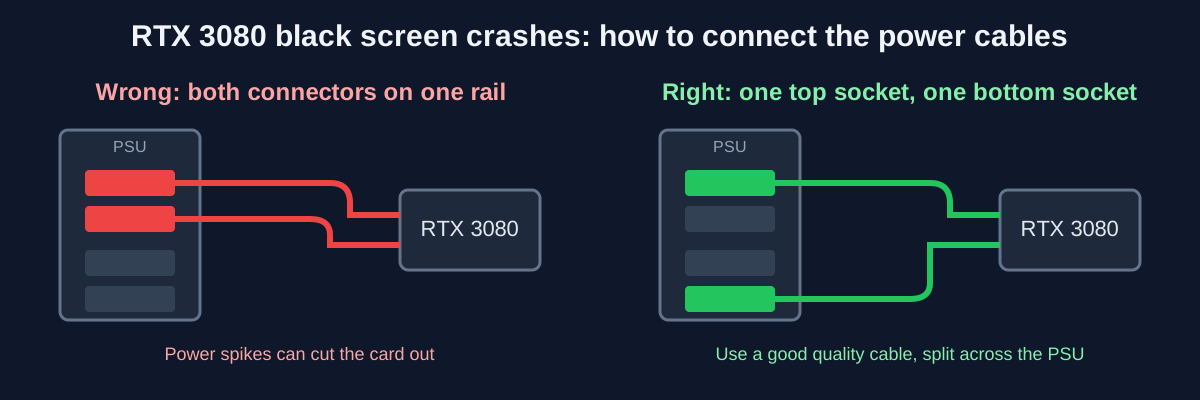
My crashes came down to two things together. First, a poor modular cable. Second, it was not connected to the PSU properly: both of the card's power connectors were fed from one rail, when one should go to a socket on the top of the PSU and the other to a socket on the bottom. An RTX 3080 pulls big power spikes, and a weak cable on a single rail can't cope, so the card cut out and the screen went black.

I bought a much better cable, split the two connectors across the top and bottom sockets, and the crashes stopped. It had cost me a month of troubleshooting. Not long after, I upgraded to an RTX 4070 Super. The issue was the sudden surge in current on the one PSU rail causing the cable or PSU to dip bellow a usable voltage threshold thus crashing the card

If it still crashes

Try other demanding games or a stress test. If they crash too, the fault is likely hardware, such as the power supply, the cables or the card, rather than your game.


Flex Radio FLEX-ACC-8P-TRS Mic cable schematic

Schematic


Can Wide-banding a radio or modifying for mars-cap damage your radio? Why do people do it?
What is Wide-banding?Wide-banding or MARS-MOD is the process of modifying a radio to transmit outside its originally designed frequency range. This is often done to allow amateur radios to operate on …

What is Wide-banding?

Wide-banding or MARS-MOD is the process of modifying a radio to transmit outside its originally designed frequency range. This is often done to allow amateur radios to operate on other services such as MARS (Military Auxiliary Radio System) or CAP (Civil Air Patrol).

LAW Issues

Modifying a radio for wide-banding may violate your licence conditions. In the UK, Ofcom regulates radio communications and any modification that causes the radio to operate outside its type-approved parameters is illegal. NOVs (Notices of Variation) in the UK allow certain exceptions but wide-banding is not typically covered.

DAMAGE Risks

Wide-banding can damage your radio in several ways: the transmitter may produce spurious emissions, the receiver may become desensitised, the front-end filters may be overloaded, and the power amplifier may be damaged by operating into a high SWR on frequencies it was not designed for.

MARS CAP Explained

MARS and CAP are US organisations that allow amateur radio operators to communicate on certain military frequencies during emergencies. Some operators modify their radios to access these frequencies.

FREEBANDING Explained

Freebanding refers to operating on frequencies between the amateur radio bands and CB radio (11 metres) without a licence. This is illegal in most countries.

CB / 11Mtrs

CB radio operates on 27 MHz (11 metres) and does not require a licence in the UK. Some modified amateur radios can operate on these frequencies but doing so with a modified radio is likely illegal.

IS LISTENING LEGAL?

Ofcom guidance on listening to transmissions can be found on their website. Generally, listening is legal but acting on what you hear or transmitting without authorisation is not.

Conclusion

Weigh the benefits of wide-banding against the risks. Seek expert advice and always comply with the law in your jurisdiction.


Yaesu FTDX-10 to Acom Linear amp PTT Cable, easy!
An easy to make, simple amp cable to hook up an amplifier or other device that needs a PTT hook up. Just ensure you do not exceed the permitted current limit of the FT-450, FT-450D, FT-950, FTDX-10, F…

An easy to make, simple amp cable to hook up an amplifier or other device that needs a PTT hook up. Just ensure you do not exceed the permitted current limit of the FT-450, FT-450D, FT-950, FTDX-10, FTDX-1200.

Cable diagram


RF EXPLORER-Spectrum Analysers, What one is right for you?
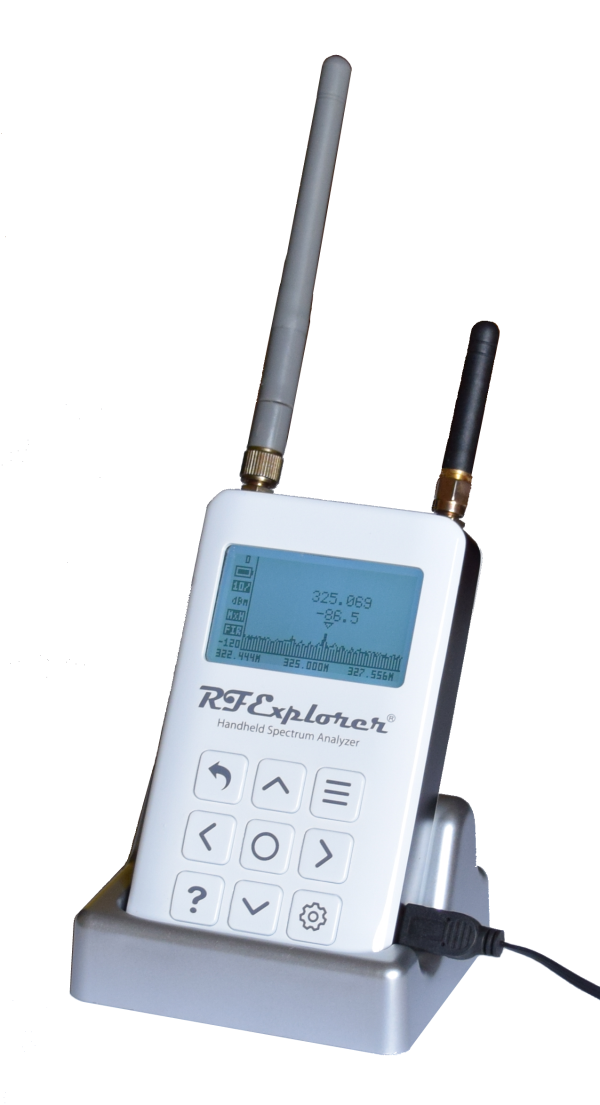
Questions to ask yourself when choosing an RF Explorer spectrum analyser:Frequency range needed β€” what frequencies do you work with?Sensitivity and accuracy requirements β€” how precise do you need to b…

Questions to ask yourself when choosing an RF Explorer spectrum analyser:

  • Frequency range needed β€” what frequencies do you work with?
  • Sensitivity and accuracy requirements β€” how precise do you need to be?
  • What measurements do you need to take? β€” spectrum analysis, tracking generator, etc.
  • Handheld vs computer-based β€” do you need portability?
  • Budget β€” how much are you willing to spend?

Visit rf-explorer.com for more information on their range of products.


GAMING: ARK Survival Evolved, a short history, Maps and more..
A Short HistoryARK Survival Evolved launched in early access in 2014 and was officially released in 2017. The game has faced controversies over microtransactions but remains one of the most popular su…

A Short History

ARK Survival Evolved launched in early access in 2014 and was officially released in 2017. The game has faced controversies over microtransactions but remains one of the most popular survival games available.

Official Maps

  • The Island
  • Scorched Earth
  • Aberration
  • Extinction
  • The Center
  • Ragnarok
  • Valguero
  • Crystal Isles
  • Lost Island
  • Fjordur

There are also many user-created maps available via the Steam Workshop.


What is FT-8? can it damage your amateur radio transceiver?
What is FT-8?FT-8 was developed by K1JT and K9AN as part of the WSJT-X software suite. It uses 8-FSK modulation with 6.25 Hz tone spacing and operates in 15-second intervals. It can decode signals 10 …

What is FT-8?

FT-8 was developed by K1JT and K9AN as part of the WSJT-X software suite. It uses 8-FSK modulation with 6.25 Hz tone spacing and operates in 15-second intervals. It can decode signals 10 dB below the noise floor, making it extremely popular for weak signal communication.

Can FT-8 damage your transceiver?

No β€” FT-8 itself cannot damage your radio. However, improper setup (such as running too much power, using a poor antenna match, or operating without proper duty cycle management) can cause damage. Always ensure your radio is properly configured when running digital modes.

Difference between FT-8 and PSK-XX

PSK-XX (such as PSK31) uses phase shift keying and operates at higher power levels with wider bandwidth. FT-8 is more robust at lower signal levels and uses much less bandwidth.

Difference between FT-8 and FT-4

FT-4 uses 4-second intervals (vs 15 seconds for FT-8) which makes it faster but less sensitive. FT-4 also transmits shorter messages and is less robust than FT-8 at very low signal levels.


What is Yaesu System fusion and whats the difference between it and Dstar?
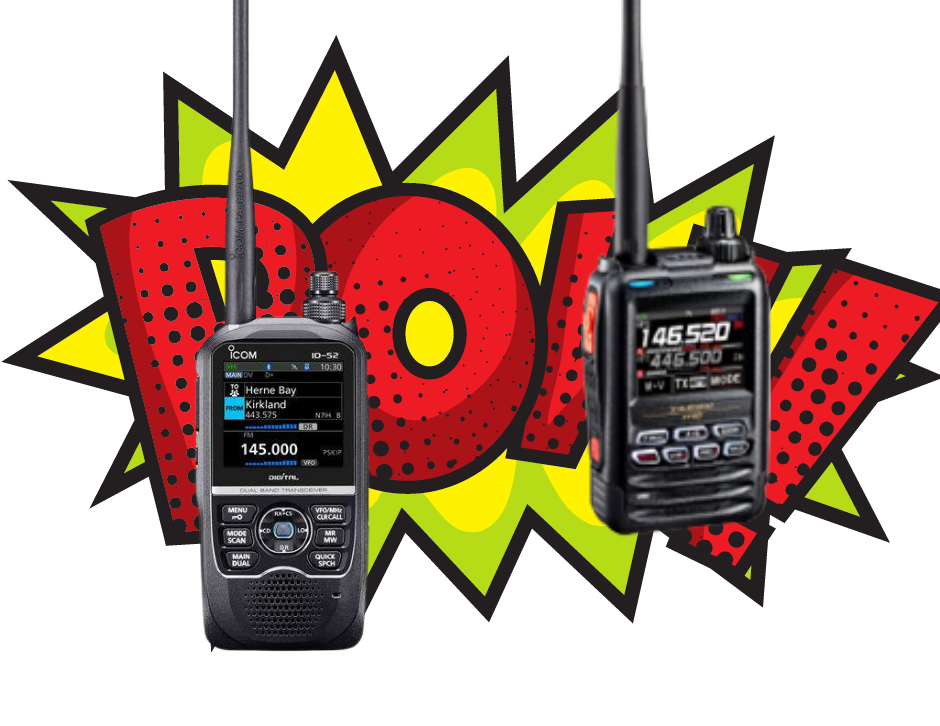
Yaesu System FusionSystem Fusion uses C4FM (4-level Frequency Shift Keying) modulation. It supports both analog FM and digital modes, making it backward compatible with existing analog repeaters.D-STA…

Yaesu System Fusion

System Fusion uses C4FM (4-level Frequency Shift Keying) modulation. It supports both analog FM and digital modes, making it backward compatible with existing analog repeaters.

D-STAR

D-STAR (Digital Smart Technologies for Amateur Radio) was developed by the Japan Amateur Radio League (JARL). It uses DQPSK modulation and is digital only.

Advantages of D-STAR

  • Larger user base worldwide
  • Better audio codec quality
  • Wider range of data modes including GPS position reporting and text messaging

Advantages of System Fusion

  • Analog backward compatibility β€” works on existing FM repeaters
  • Both C4FM and FDMA modes supported

Which one should you choose?

The choice depends on regional availability of repeaters and personal preference. Check what repeaters are available in your area before making a decision.

This site shows ads served by Google AdSense. Privacy Policy Β· About Β· Contact