Dashboard · Videos · Links · Yaesu · Mesh · Admin
🔍
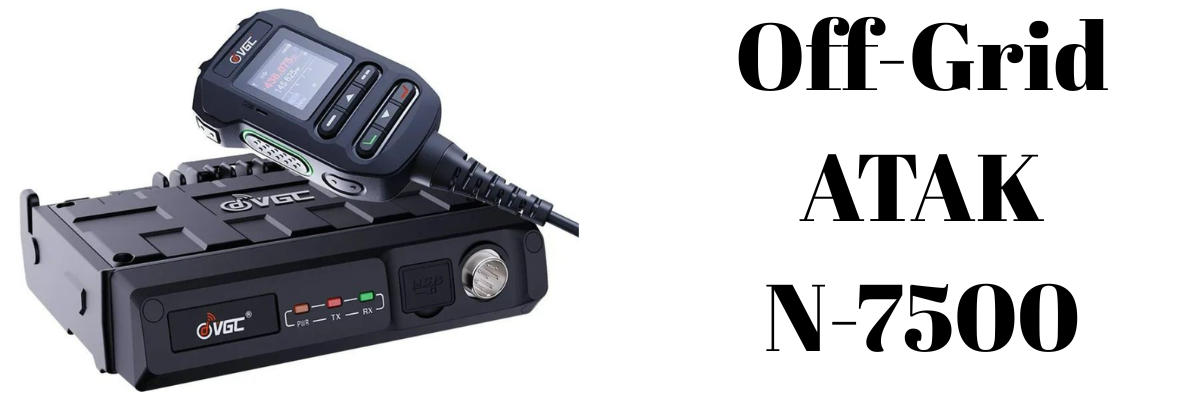
Off-Grid ATAK Capabilities with the VGC VR-N7500 Bluetooth Radio
Off-Grid ATAK Capabilities with the VGC VR-N7500 Bluetooth Radio Off-Grid ATAK Capabilities with the VGC VR-N7500 Bluetooth Radio The VGC VR-N7500 is a 50W headless dual-band mobile transceiver that h…
Off-Grid ATAK Capabilities with the VGC VR-N7500 Bluetooth Radio

Off-Grid ATAK Capabilities with the VGC VR-N7500 Bluetooth Radio

The VGC VR-N7500 is a 50W headless dual-band mobile transceiver that has quietly become one of the most capable off-grid ATAK radio platforms available for vehicle and overlander installs. With a built-in hardware KISS TNC accessible over Bluetooth, it removes the need for external TNC dongles or cables — and pairs directly with Android ATAK plugins to share positions, relay CoT data, and send GeoChat messages entirely without cell service or internet.

This post covers how the integration works, which plugins are available, what iOS users can and can't do, and the practical setup considerations.


What Makes the VR-N7500 ATAK-Capable

Most off-grid ATAK setups require an external TNC (Terminal Node Controller) to translate between the radio's audio and the digital data formats ATAK uses. The VR-N7500 skips that entirely. It has a native hardware KISS TNC built into the radio body, exposed wirelessly over Bluetooth SPP (Serial Port Profile). Any app or plugin that speaks KISS TNC can connect directly to the radio from an Android device — no cables, no adapters.

The KISS TNC capability was added via a firmware update in January 2025. Since then, users have confirmed compatibility with APRSdroid, RadioMail, and Winlink, as well as the ATAK plugins detailed below.

Other headline specs relevant to ATAK use:

  • 50W VHF / 40W UHF — significantly more range than handheld alternatives
  • Headless design: mounts out of sight in a vehicle, controlled entirely via smartphone or tablet over Bluetooth
  • Supports multiple simultaneous Bluetooth connections (phone, PTT button, headset)
  • APRS, SSTV, and packet radio support
  • Android and iOS compatible for the native HT App (basic radio control only)

How the ATAK Data Path Works

The integration follows a straightforward stack:

  1. ATAK Plugin on the Android EUD generates CoT (Cursor on Target) data — positions, markers, chat messages, routes
  2. The plugin connects to the radio via Bluetooth SPP and sends data using the KISS TNC protocol
  3. The radio encapsulates the data in AX.25 frames and transmits over VHF or UHF
  4. Other radios in range receive the frames, decode them, and pass the CoT data up to their connected ATAK instances

Incoming packets from other operators are decoded by the plugin and appear as contacts, map markers, and chat messages on your ATAK display. The entire loop runs without any infrastructure — no repeater, no server, no internet.


ATAK Plugin Options

BTECH Relay (Open Source)

Originally developed for the BTECH UV-PRO, the BTECH Relay plugin uses the same Bluetooth SPP + KISS TNC interface that the VR-N7500 exposes, making it a strong compatibility candidate. It is free and open source, available on GitHub.

Capabilities include:

  • GPS position beaconing at a configurable interval
  • GeoChat relay between radio-equipped operators
  • CoT event relay — markers, routes, sensor data — with automatic fragmentation and reassembly for large packets
  • Optional AES-256-CBC passphrase encryption on all transmitted data
  • Persistent connection state indicator on the ATAK map
  • Auto-connect to last used radio on ATAK startup

TAK-UV-PRO (Open Source)

A fork of the BTECH Relay project, also available on GitHub, with additional features including APRS-standard SmartBeaconing — speed-proportional beacon rate with corner pegging — and automatic ping response with current GPS position.

GoTAK Radio Relay (Commercial)

A more advanced commercial option from Guerrilla Dynamics / GoTAK. In addition to basic CoT relay, it provides self-healing mesh networking across multiple radios in range, bridging between off-grid radio operators and TAK Servers or MANET networks. Operators who drop off the mesh are automatically rerouted through other nodes.

HAMMER Plugin

A fallback option that doesn't require KISS TNC at all. HAMMER acts as an acoustic software modem, transmitting CoT data through the radio's audio path — essentially encoding data as sound over any voice-capable radio. Throughput and reliability are lower than KISS TNC, but it works with virtually any radio.


Practical Setup Notes

Tablet as mission control. Because the VR-N7500 is headless, pairing it with an 8-inch Android tablet mounted on the dash gives you a large ATAK display alongside full radio control — a significantly better experience than a phone screen in a moving vehicle.

Bluetooth pairing quirk. The radio connects best when the app (ATAK plugin or HT App) initiates the Bluetooth connection, rather than pairing through Android's system Bluetooth settings. Pairing via settings first and then opening the app often results in the app not seeing the radio. Let the app handle the connection.

Power considerations. At 50W output the radio draws significant current — proper vehicle wiring to the battery with appropriate fusing is important, especially for extended off-grid use.

Antenna matters. The VR-N7500 requires an external antenna. For vehicle installs, a quality NMO-mount antenna on the roof will substantially outperform a magnetic-mount antenna, particularly for AX.25 data reliability at range.


iOS Support — What's Possible and What Isn't

This is the most common question and the honest answer is: iTAK exists for iOS and works well in connected environments, but direct radio plugin integration with the VR-N7500 is Android-only.

What iTAK offers

iTAK, developed by the TAK Product Center, is a free iOS app compatible with iPhone and iPad running iOS 14.1 or later. It provides maps, overlays, blue force tracking, GeoChat, and full interoperability with TAK servers, WinTAK, and ATAK. On a network — whether cell, WiFi, or satellite backhaul — iOS users are full participants in the TAK ecosystem.

The plugin limitation

iOS does not support the same external plugin architecture that Android does. The BTECH Relay, TAK-UV-PRO, and GoTAK Radio Relay plugins that bridge KISS TNC radios into ATAK simply cannot run on iOS. This is an Apple platform restriction, not a radio limitation.

Off-grid workarounds for iOS

The most practical workaround is to use an Android device as the radio-connected node and run a local TAK server (or hotspot) that iOS users connect to over WiFi. The Android EUD acts as the RF bridge — it relays CoT from the radio network to the local server, and iTAK users on the hotspot see everything on their maps.

For LoRa mesh (Meshtastic), a separate path now exists: as of February 2026, the Meshtastic iOS app includes a built-in TAK server, allowing iTAK to connect to a LoRa radio over Bluetooth without Android. This does not apply to the VR-N7500, which operates on VHF/UHF rather than LoRa.

Summary table

Capability Android + VR-N7500 iOS (iTAK)
TAK app ATAK iTAK
TAK Server (online/WiFi) Yes Yes
Bluetooth KISS TNC plugin Yes No
Off-grid CoT via VHF/UHF radio Yes No (direct)
Off-grid via Android bridge node Yes (bridge) Yes (via hotspot)

Off-Grid Capability Summary

Capability Available
Blue force tracking (GPS position sharing) Yes
GeoChat messaging Yes
CoT marker and route relay Yes
APRS tracking (APRSdroid) Yes
Winlink email Yes
SSTV image transmission Yes
AES-256 encryption (plugin level) Yes (BTECH Relay)
No cell or internet required Yes

Final Thoughts

The VGC VR-N7500 occupies a useful gap in the off-grid ATAK radio landscape. Handheld KISS TNC radios like the BTECH UV-PRO are more portable and cheaper, but top out at around 5W. The VR-N7500 brings 50W of output power, a clean vehicle install with no visible faceplate, and the same Bluetooth KISS TNC interface — making it the strongest option for vehicle-mounted off-grid TAK setups that need range.

The main constraints are the Android requirement for radio plugin integration and the need for an Android bridge node if iOS operators are part of your team. Within those bounds, the capability set is comprehensive: real-time position sharing, full CoT relay, encrypted messaging, and APRS/Winlink — all over VHF/UHF with no infrastructure dependency.


New from MetroPWR, a new range of Power Meters
New Product Range Introducing Metrowpwr Professional-grade station control, metering, and remote operation — built for the serious amateur radio operator. We've been listening. Operators want power me…

New Product Range

Introducing Metrowpwr

Professional-grade station control, metering, and remote operation — built for the serious amateur radio operator.

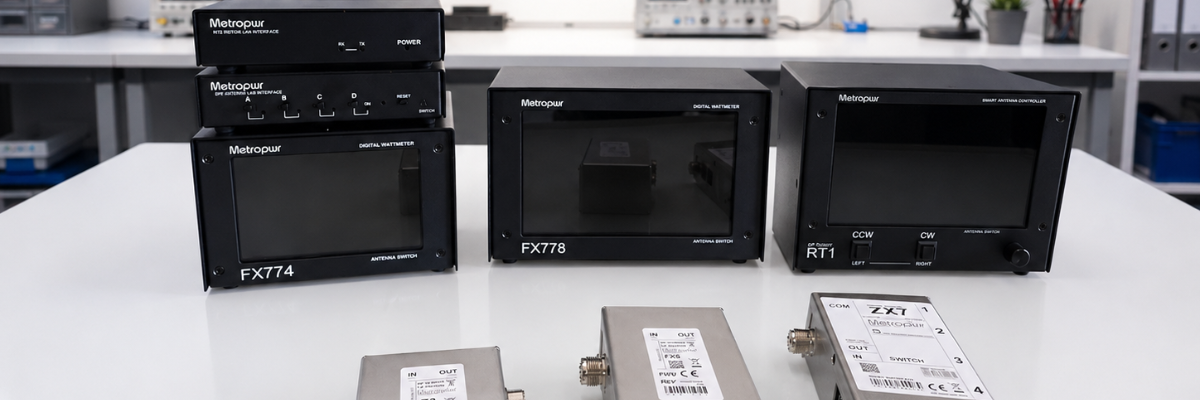
We've been listening. Operators want power metering they can trust, antenna switching that keeps up with contest rates, rotator control that just works, and the freedom to run a full station remotely without compromise. The Metrowpwr range delivers all of it — in a cohesive family of products engineered to work together or standalone.

Here's everything that's new.


Wattmeter FX778 + Z3

7" Wattmeter — 3kW / 5kW

The FX778 paired with the Z3 sensing unit gives you a large, bright 7-inch display showing forward and reflected power in real time. Whether you're running a barefoot rig or pushing legal limit with a kilowatt amplifier, the dual 3kW and 5kW ranges keep you covered without range-switching guesswork.

The Z3 coupler is designed for low insertion loss and high accuracy across HF and 6m, with a robust build that handles sustained high-power operation without drift. The 7-inch display makes reading power levels effortless from across the shack — no squinting at a needle.

Spec Detail
Display 7-inch colour screen
Power Ranges 3kW / 5kW
Sensing Unit Z3 Wattmeter coupler
Measurement Forward & reflected power, SWR
Wattmeter FX774 + Z3

5" Wattmeter — 2kW / 5kW

For operators who want the same Z3 sensing accuracy in a more compact package, the FX774 delivers a crisp 5-inch display with 2kW and 5kW range options — ideal for a tighter operating desk or a second position in the shack.

Both wattmeters in the Metrowpwr range share the same Z3 coupler, meaning you can move the sensing unit between positions and upgrade your display without replacing your investment in the RF hardware.

Spec Detail
Display 5-inch colour screen
Power Ranges 2kW / 5kW
Sensing Unit Z3 Wattmeter coupler (shared with FX778)
Measurement Forward & reflected power, SWR
Antenna Switch ZX7

ZX7 — 1×4 Antenna Switch, 2kW

The ZX7 is a solid-state 1-into-4 antenna switch rated to 2kW — built for contesters, DXpeditioners, and anyone who regularly swaps between multiple antennas without wanting to touch a coax connector. Switching is fast, quiet, and safe at full power.

With four output ports, the ZX7 is the natural companion to the SPE interface (see below), enabling full remote antenna selection when operating over the internet. Used locally, it integrates cleanly with logging software and station controllers.

Spec Detail
Configuration 1 input × 4 outputs
Power Rating 2kW
Control Local & remote (via SPE interface)
Rotator Control RT1

RT1 — Rotator Controller for Yaesu (as Microham Arco)

The RT1 is a modern rotator controller for Yaesu rotators, designed and produced to the same specification as the well-regarded Microham Arco. If you've used the Arco, you already know what to expect: reliable, software-compatible control with a clean interface and solid logging software integration.

The RT1 connects directly to your Yaesu rotator and presents a familiar control interface compatible with the most popular shack software. For operators who want to take their beam heading control remote, the RT2 (below) extends this capability over a LAN connection.

Spec Detail
Compatible Rotators Yaesu series
Specification Equivalent to Microham Arco
Software Compatible with major logging & control software
Remote Extension Via RT2 interface (LAN/internet)
Remote Operation SPE Interface

SPE Interface — Remote Amplifier & Antenna Switch Control

The SPE interface is the gateway to running your Expert amplifier and antenna switch from anywhere in the world. Connect it at the shack end, and you can control your Expert linear amplifier — band selection, power settings, operating mode — over the internet as if you were sitting in front of it.

Combined with the ZX7 antenna switch, you gain complete RF path control remotely. Point your beam, select your antenna, fire up the amplifier, and work the pile-up — all from a hotel room, a holiday cottage, or the other side of the planet. This is serious remote station capability, not a workaround.

Function Detail
Amplifier Control Expert SPE amplifiers, over internet
Antenna Switching ZX7 1×4 switch, remote selection
Connection Internet / LAN
Use Case Full remote station operation
Remote Operation RT2

RT2 — Remote Yaesu Rotator Control via LAN / Internet

The RT2 completes the remote station picture for beam antenna operators. Working alongside the RT1 controller, the RT2 provides a LAN and internet interface so you can point your Yaesu rotator from anywhere — no need for a separate remote desktop session or a third-party relay.

Control is direct and responsive. Head into a new bearing, watch the rotator track in real time, and get on with operating. Whether you're running a remote contest station or simply controlling a home antenna from the back garden with a tablet, the RT2 makes it seamless.

Function Detail
Rotator Compatibility Yaesu rotors (via RT1)
Connection LAN / Internet
Control Real-time remote heading, position feedback
Use Case Remote beam antenna operation

A Complete System, or Piece by Piece

Every product in the Metrowpwr range works independently — but the real power is in how they combine. The wattmeters give you accurate power monitoring. The ZX7 gives you flexible antenna management. The RT1 and RT2 put your beam under network control. And the SPE interface ties your amplifier and antenna switching into a single remotely-operated station.

It's the kind of system that contest operators, DX chasers, and remote station builders have been building themselves from bits and pieces for years. Metrowpwr does it properly, in a coherent, supported package.

All products are available now. Contact us or visit the Metrowpwr product pages for full specifications, pricing, and ordering information.

Metrowpwr Range

Ready to upgrade your station?

Get in touch to discuss the full range, compatibility with your existing setup, and what combination is right for your operating style.

Metrowpwr — Professional Station Equipment for the Serious Amateur


SEEED T1000E MeshTastic Tracker
Seeed SenseCAP T1000-E: The Tracker That Disappears Into Your Pocket *, *::before, *::after { box-sizing: border-box; margin: 0; padding: 0; } :root { --ink: #1a1612; --ink-mid: #4a4540; --ink-light: …
Seeed SenseCAP T1000-E: The Tracker That Disappears Into Your Pocket
Field Notes & Hardware Reviews June 2026
Meshtastic · LoRa · GPS Tracking

The Tracker That Disappears Into Your Pocket

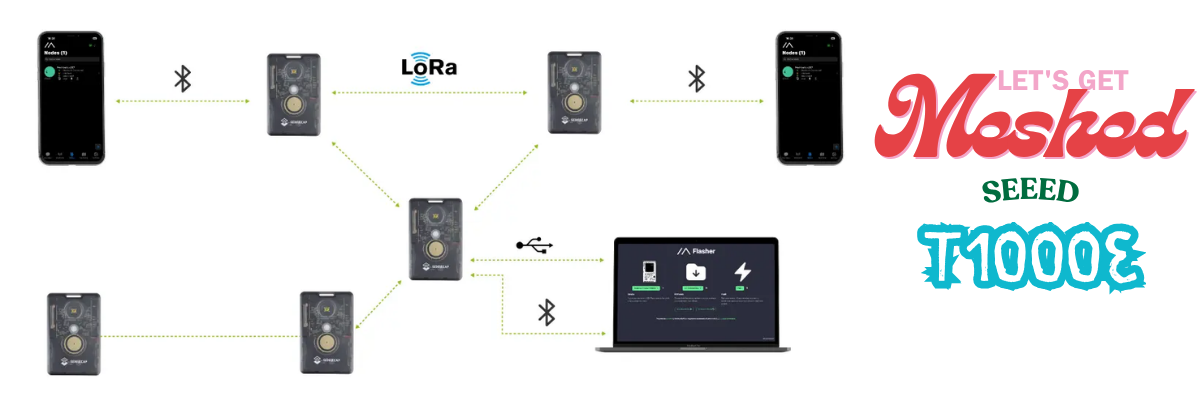
Seeed's SenseCAP T1000-E squeezes a GNSS module, LoRa radio, and 700 mAh battery into a credit-card frame — and costs less than a decent meal out.

Supplier
ML&S
Dimensions
85 × 55 × 6.5 mm
Battery
700 mAh
Rating
IP65
Firmware
Meshtastic / MeshCore

There is a certain satisfaction in hardware that simply works. No IDE needed, no soldering iron on standby, no driver dramas. You take it out of the box, flash the firmware via a web browser, pair it over Bluetooth to the Meshtastic app, and that is that — you are on the mesh. The Seeed SenseCAP T1000-E is that device.

It is, by any honest reckoning, a remarkable amount of hardware for the money. At 85 × 55 × 6.5 mm — exactly the footprint of the card slot in your wallet — it goes anywhere without complaint. Jacket pocket, rucksack hip-belt, dog collar, bicycle frame bag. The form factor is not a gimmick; it genuinely changes where and how you carry a mesh node.

"The T1000-E is the tracker you keep forgetting you're carrying — which is precisely the point."

What is inside the card

The hardware story is genuinely impressive for this price bracket. Seeed have not reached for bargain-bin silicon.

MCU
Nordic nRF52840
The same low-power chip found in the RAK4631 and LilyGo T-Echo. Sleep current sits in the single-digit microamps — essential for multi-day battery life.
LoRa Radio
Semtech LR1110
Covers global ISM bands from 863–928 MHz. The LR1110 is a more integrated transceiver than the ubiquitous SX1262, with solid sensitivity figures.
GNSS
Mediatek AG3335
A dedicated, multi-constellation GPS module. High-precision positioning for real-time location sharing without any cellular dependency.

That Mediatek GPS chip deserves a moment. A dedicated GNSS module — not a software-defined approximation, not Wi-Fi triangulation — at this price point is genuinely uncommon. It is the sort of component that makes the overall proposition rather difficult to argue with.

Range and real-world performance

Range is where devices with integrated antennas typically take their lumps, and physics being what it is, the T1000-E is no exception. Without an external antenna, it cannot match a full-size handheld mesh node. That said, field tests have demonstrated reliable contact with base stations elevated over 50 metres, and solid city-block-scale coverage to vehicle nodes. For the use cases the form factor implies — personal tracking, asset tagging, lightweight mesh participation — it is more than adequate.

In urban environments, expect somewhere in the region of one and a half to two kilometres of practical range with obstructions in the way. Out in open countryside, rather more. The key insight is that a T1000-E riding in your rucksack, contributing to the mesh as a relay node whilst simultaneously reporting your position, is doing something no full-size node can manage from a trouser pocket.

The charging compromise

The one polarising design decision is charging. Rather than USB-C, the T1000-E uses a four-pin pogo connector — magnetic, proprietary, and the reason the device can be sealed to IP65. The trade-off is deliberate: the sealed casing is meaningfully more rugged than anything with a port flap, and IP65 means genuine protection from rain and dust. It does, however, mean carrying a dedicated charging puck, which some will find a mild irritant and others will consider a non-issue.

Battery life lands at several days on standby with GPS disabled, or roughly a full day with active location tracking. Use it hard as a repeating node with frequent position broadcasts and you will be charging it each evening — perfectly manageable, but worth knowing before you head out on a multi-day trip.

Getting started

Setup is refreshingly straightforward. Navigate to the Meshtastic Web Flasher, select the T1000-E from the device list, and flash. No IDE, no command line, no drivers. The device ships with firmware pre-installed, so for most users it is simply a matter of pairing over Bluetooth and selecting your region in the app — you will be on the mesh within minutes of unboxing.

The pogo pins also serve as a developer interface: USB, serial logging, and a DFU mode are all accessible there for anyone who wishes to dig into the firmware, or who wants to run it as a LoRaWAN asset tracker rather than a Meshtastic node — a separate firmware variant is available for that purpose.

· · ·

Verdict

Strengths

  • Genuinely credit-card sized and pocketable
  • Dedicated AG3335 GPS — real precision
  • IP65 rated — splash and dust resistant
  • No-code setup via web flasher
  • Supports Meshtastic and MeshCore
  • Multi-day standby battery life
  • Clip and carabiner attachment included
  • Exceptional value for money

Limitations

  • Proprietary pogo-pin charging, not USB-C
  • No external antenna option
  • Range trails larger, external-antenna nodes
  • GPS-on battery life is roughly one day
  • No display or buttons for standalone use
9
/ 10
Final verdict
The T1000-E is the easiest recommendation in Meshtastic hardware right now. If you need a no-fuss tracker to keep tabs on a person, pet, or a piece of kit — and you want it to participate in the mesh whilst doing so — nothing else at this price comes close. The pogo charging is the only genuine friction, and even that becomes second nature quickly. Pick one up from ML&S, flash it, and forget you are carrying it.
Meshtastic LoRa GPS Seeed Studio Mesh Networking Off-Grid
Available from ML&S · hamradio.co.uk

SunSDR DX2 connection to MixW a guide..
SunSDR DX — CAT Control with MixW2 & Omnirig | Gazlabs @import url('https://fonts.googleapis.com/css2?family=IBM+Plex+Mono:wght@400;600&family=IBM+Plex+Sans:wght@400;500;600&display=swap'); *, *::befo…
SunSDR DX — CAT Control with MixW2 & Omnirig | Gazlabs
Gazlab
gazlabs.co.uk

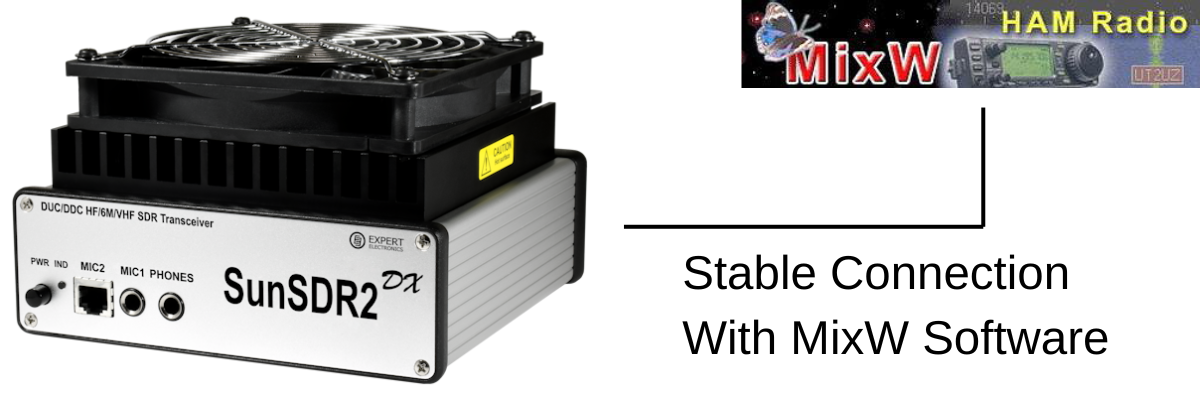
SunSDR DX — CAT Control with MixW2 & Omnirig  •  Setup & Troubleshooting Guide

How It Works

ExpertSDR2 emulates a Kenwood TS-480 via ECATv1 over a virtual COM port pair. Omnirig connects to that port and acts as a CAT broker for MixW2. Audio routes via Virtual Audio Cable (VAC).

ExpertSDR2 (ECATv1) → Virtual COM pair → Omnirig → MixW2
Step 1 — Install a Virtual COM Port Pair
  • com0com (free) — sourceforge.net/projects/com0com
  • VSP Manager by K5FR (free) — k5fr.com

Create a pair using low numbers e.g. COM5 ↔ COM6. ExpertSDR2 uses one end; Omnirig the other.

Note: Enable Emulate baud rate in com0com on both ends — without it, idle silence is treated as a dead connection.
Step 2 — Configure ExpertSDR2 (ECATv1)

Options > ECATv1 > tick Enable CAT:

SettingValue
Virtual COM portCOM5 (first end of pair)
Baud rate115200
Data / Parity / Stop8 / None / 1
Rig emulationKenwood TS-480
Step 3 — Configure Omnirig

Settings > Rig 1:

SettingValue
Rig typeKenwood TS-480
PortCOM6 (second end of pair)
Baud rate115200
Data / Parity / Stop8 / None / 1
RTS / DTRHigh / High
Poll interval100 ms (critical — keeps connection alive)
Timeout4000 ms
Note: 100 ms poll means Omnirig queries the radio constantly, even when idle. Without this the connection drops on inactivity.
Step 4 — Configure MixW2

Configure > TRX/CAT > select Omnirig / Rig 1. MixW2 talks to the radio through Omnirig — no direct COM port needed.

Step 5 — Audio via Virtual Audio Cable

Install VAC from vac.muzychenko.net. Enable the VAC button in ExpertSDR2.

ProgramInputOutput
ExpertSDR2VAC Line 2 (TX from MixW2)VAC Line 1 (RX to MixW2)
MixW2VAC Line 1VAC Line 2
Fixing CAT Drops on Inactivity

Drops when you stop tuning or change focus? Idle timeout somewhere in the chain. Work through these:

FixAction
1  Omnirig poll 100 msSet poll interval to 100 ms. Keeps traffic flowing so port never goes idle.
2  Windows USB powerDevice Manager > Ports > right-click COM port > Power Management > uncheck allow sleep. Repeat for USB Root Hubs. Set Power Plan to High Performance.
3  com0com baud rateTick Emulate baud rate on both ends of the virtual pair.
4  Omnirig timeoutSet timeout to 4000 ms.
5  Switch to TCI/SDCReplace ECATv1 with TCI via SDC. Most stable fix — see section below.
6  Update ExpertSDR2Older versions had CAT bugs. Get latest from expertelectronics.ru.
7  Low COM numbersKeep ports below COM10 — high numbers cause issues in some software.
Tip: If fixes 1–4 don’t solve it, go straight to TCI/SDC (Fix 5). It’s the only method confirmed fully stable by SunSDR DX users.
Advanced: Stable Connection via TCI and SDC
What is TCI?  TCI (Transceiver Control Interface) is Expert Electronics’ native protocol for ExpertSDR2. It runs over a WebSocket on localhost — not a serial port emulation. Persistent, fast, doesn’t go idle.

SDC bridges TCI to a virtual COM port so Omnirig connects normally. ECATv1 is removed from the chain.

ExpertSDR2 (TCI/WebSocket) → SDC → Virtual COM → Omnirig → MixW2
Real-world fix:  Customer tried every method — all dropped. Switched to TCI/SDC — instant stable connection. Catch: RIG Emulator was missing in SDC because the version was too old. Fix: find the cumulative update on the UT4LW site, get a reg key, update. Working version: SDC v19.06 x64.
Step A — Enable TCI in ExpertSDR2

Options > TCI > tick enable:

SettingValue
Enable TCITick
Port50001 (default)
Addresslocalhost / 127.0.0.1
Step B — Install SDC (version matters)

Download from UT4LW website. If RIG Emulator is missing, the version is too old.

Note: Get the cumulative update — requires a registration key. Confirmed working: SDC v19.06 x64.
  • Add TCI Client → address: localhost, port: 50001
  • Add RIG Emulator output → assign to COM7
Step C — Point Omnirig at SDC

Change Omnirig port from COM6 to COM7 (the SDC RIG Emulator). All other settings stay the same.

Note: ECATv1 and TCI can run together in ExpertSDR2. Test SDC alongside your existing setup before switching fully.
Quick Reference

Standard (ECATv1):

SoftwarePortRole
ExpertSDR2 ECATv1COM5CAT out (TS-480 emulation)
Omnirig Rig 1COM6CAT in (100 ms poll)
MixW2OmnirigVia Omnirig Rig 1
ExpertSDR2 VACVAC Line 1RX audio to MixW2
MixW2 audio outVAC Line 2TX audio to ExpertSDR2

Stable (TCI + SDC v19.06 x64):

SoftwarePort / AddressRole
ExpertSDR2 TCIlocalhost:50001TCI WebSocket server
SDC TCI Clientlocalhost:50001Connects to ExpertSDR2
SDC RIG EmulatorCOM7Virtual CAT port for Omnirig
Omnirig Rig 1COM7CAT in (100 ms poll)
MixW2OmnirigVia Omnirig Rig 1
ExpertSDR2 VACVAC Line 1RX audio to MixW2
MixW2 audio outVAC Line 2TX audio to ExpertSDR2
gazlabs.co.uk  •  Ham Radio, Electronics & IT

Is AI Taking over the world?
🤖 Is AI taking over the world, or are we all just helping it move in? Today it's writing emails, creating images, answering questions, and helping with work. Tomorrow... ✅ Emptying the bins ✅ Driving …
🤖 Is AI taking over the world, or are we all just helping it move in? Today it's writing emails, creating images, answering questions, and helping with work. Tomorrow... ✅ Emptying the bins ✅ Driving trains ✅ Flying aircraft ✅ Running customer service ✅ Managing businesses ✅ Telling us what to watch, eat, buy and think about next But here's the thing... If AI eventually does most of the skilled jobs, where will the next generation of experts come from when something goes wrong? Who fixes the AI when the people who would have learned those skills never got the chance because AI was already doing the job? Are we heading towards a futuristic utopia where machines handle all the boring stuff, or are we creating the world's biggest game of Chinese Whispers, where AI learns from AI, which learned from AI, until nobody really knows where the original answer came from? 🤔 Will it be flying planes and running railways while we're all putting our feet up? Or will the whole thing eventually hit a wall and fizzle out because there aren't enough people left who understand how it all works? Genuinely curious what people think. Is AI the future... or are we currently living through the biggest technology experiment in history? 🤖🍿🌍 PS written by AI... GazLabs is a little bit scared now... I peeked through the AI window and saw a shadow, or was it just a dirty mark on a wall lol

New website, New direction..
Hope you like it I have spent an enormous amount of time working out how and what I wanted to do and learned 200 new skills along the way! Gaz

CiroLoop Fault Finder
Check out the Ciro Baby Loop Fault Finder — a web-based tool to diagnose issues with your Ciro Baby Loop antenna. Enter your symptoms and get guided troubleshooting steps.

Check out the Ciro Baby Loop Fault Finder — a web-based tool to diagnose issues with your Ciro Baby Loop antenna. Enter your symptoms and get guided troubleshooting steps.


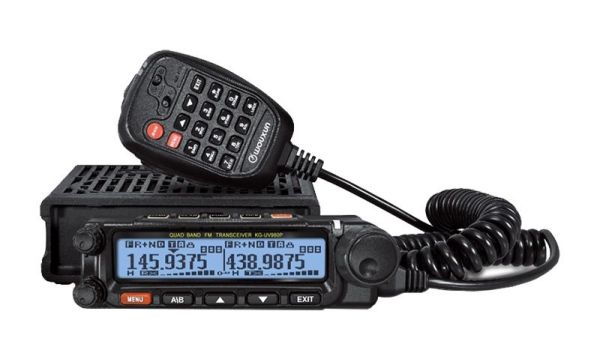
Wouxun 980PL Software
Key FeaturesDual Band: VHF and UHF frequency coverage for versatile communication options.High Power Output: Up to 50 watts of power output for extended range.Wide Frequency Range: Covers 136-174 MHz …

Key Features

  • Dual Band: VHF and UHF frequency coverage for versatile communication options.
  • High Power Output: Up to 50 watts of power output for extended range.
  • Wide Frequency Range: Covers 136-174 MHz and 400-490 MHz.
  • Large LCD Display: Easy to read and navigate.
  • Scanning Modes: Multiple scanning modes for finding active channels.
  • Built-in Speaker: Clear and loud audio output.
  • Durable Construction: Rugged design for tough environments.

Fun Ways to Use It

  • Road Trips: Stay connected with fellow travelers on long journeys.
  • Outdoor Adventures: Keep in touch with your group while hiking, camping, or exploring.
  • Emergency Preparedness: Have a reliable communication tool during natural disasters or emergencies.
  • Community Events: Coordinate with volunteers at marathons, parades, and festivals.

Tips for Getting the Most Out of Your Wouxun 980PL

  • Take Time to Learn the Features: Although the menu is simple, reading the manual will help you discover all of its capabilities.
  • Keep the Firmware Updated: Visit Wouxun's website (wouxun.com) periodically to check for firmware updates that may improve performance or add new features.
  • Always Practice Good Etiquette: Use clear and concise language, and listen before transmitting.
  • Check Your Antenna: An antenna analyzer can ensure your antenna is properly tuned for the frequencies you use most.

Conclusion

The Wouxun 980PL is a feature-rich dual band radio for amateur radio enthusiasts and professionals. Its high power output and range make it ideal for communication across long distances. With proper use and care this radio can provide years of reliable service.


Yaesu FT5 Unknown USB Device (Device descriptor Request Failed)
I have seen a few people getting the dreaded Unknown USB Device (Device descriptor Request Failed) error when connecting their Yaesu FT5 to their PC. I should start by saying the supplied USB cable (Y…

I have seen a few people getting the dreaded Unknown USB Device (Device descriptor Request Failed) error when connecting their Yaesu FT5 to their PC. I should start by saying the supplied USB cable (YAESU SBR-36-MU) is for FIRMWARE updates ONLY. You will still need the SCU-57 for programming the radio. The PL2303 driver is also for the SCU-57. If you want to program the radio without the SCU-57 you will need to use an SD card.

Firmware update steps:

  1. Remove the battery from the radio.
  2. Move the switch on the back of the radio to the "Update" position.
  3. Plug the USB cable into the radio and your PC.
  4. Install the drivers (they are on the Yaesu website).
  5. Connect the power to the radio.
  6. When you are in the firmware update mode you will see the update screen, open the firmware update software. You can ignore COM port and Baud rate settings — just run UPDATE.
  7. Wait. The software will look like it is not doing anything at first but it is. Wait a good couple of minutes and you will see it start to update.
  8. When it is done, you're finished.

The manual is as unhelpful as ever, but hopefully these steps help you get your FT5 updated. Good luck!


Acom 1200S to Yaesu FTDX-5000
5 core screened 22AWG 2547 cable: https://bit.ly/3mMJdox

5 core screened 22AWG 2547 cable: https://bit.ly/3mMJdox

Wiring diagram


ARK Survival, Nvidia RTX-3080 crashing to black screen. 12 things to try!
If you are experiencing RTX 3080 crashes to black screen while playing ARK Survival Evolved, here are 12 things to try:Update your GPU drivers — make sure you have the latest drivers from Nvidia.Updat…

If you are experiencing RTX 3080 crashes to black screen while playing ARK Survival Evolved, here are 12 things to try:

  1. Update your GPU drivers — make sure you have the latest drivers from Nvidia.
  2. Update your OS and motherboard firmware — ensure Windows and BIOS are up to date.
  3. Disable antivirus and GPU software — temporarily disable any overlay or monitoring software.
  4. Monitor your temperatures — use HWMonitor to check GPU and CPU temps.
  5. Run a hardware diagnostic — test your RAM and GPU for errors.
  6. Use proper power cables — do not use adapters or daisy-chain cables.
  7. 1000W PSU is barely enough — the RTX 3080 has massive power spikes.
  8. Lower your game settings — especially shadows and textures.
  9. Verify game files — use Steam to verify ARK's installation.
  10. Use a single monitor — multi-monitor setups can cause issues.
  11. Remove USB graphics adapters — these can conflict with the GPU.
  12. Reinstall the game — ARK is 475GB, a fresh install may help.

I experienced this issue for a whole month before finding a fix. Hopefully one of these steps helps you.


Flex Radio FLEX-ACC-8P-TRS Mic cable schematic

Schematic


Acom amplifier band data/PTT cable for Icom. **UDATED**
15 way D-Sub to 3.5mm Jack Plug and 8 Pin DIN. Use at your own risk as always — you are licensed for a reason.

15 way D-Sub to 3.5mm Jack Plug and 8 Pin DIN. Use at your own risk as always — you are licensed for a reason.

Cable diagram


Can Wide-banding a radio or modifying for mars-cap damage your radio? Why do people do it?
What is Wide-banding?Wide-banding or MARS-MOD is the process of modifying a radio to transmit outside its originally designed frequency range. This is often done to allow amateur radios to operate on …

What is Wide-banding?

Wide-banding or MARS-MOD is the process of modifying a radio to transmit outside its originally designed frequency range. This is often done to allow amateur radios to operate on other services such as MARS (Military Auxiliary Radio System) or CAP (Civil Air Patrol).

LAW Issues

Modifying a radio for wide-banding may violate your licence conditions. In the UK, Ofcom regulates radio communications and any modification that causes the radio to operate outside its type-approved parameters is illegal. NOVs (Notices of Variation) in the UK allow certain exceptions but wide-banding is not typically covered.

DAMAGE Risks

Wide-banding can damage your radio in several ways: the transmitter may produce spurious emissions, the receiver may become desensitised, the front-end filters may be overloaded, and the power amplifier may be damaged by operating into a high SWR on frequencies it was not designed for.

MARS CAP Explained

MARS and CAP are US organisations that allow amateur radio operators to communicate on certain military frequencies during emergencies. Some operators modify their radios to access these frequencies.

FREEBANDING Explained

Freebanding refers to operating on frequencies between the amateur radio bands and CB radio (11 metres) without a licence. This is illegal in most countries.

CB / 11Mtrs

CB radio operates on 27 MHz (11 metres) and does not require a licence in the UK. Some modified amateur radios can operate on these frequencies but doing so with a modified radio is likely illegal.

IS LISTENING LEGAL?

Ofcom guidance on listening to transmissions can be found on their website. Generally, listening is legal but acting on what you hear or transmitting without authorisation is not.

Conclusion

Weigh the benefits of wide-banding against the risks. Seek expert advice and always comply with the law in your jurisdiction.


Yaesu FTDX-10 to Acom Linear amp PTT Cable, easy!
An easy to make, simple amp cable to hook up an amplifier or other device that needs a PTT hook up. Just ensure you do not exceed the permitted current limit of the FT-450, FT-450D, FT-950, FTDX-10, F…

An easy to make, simple amp cable to hook up an amplifier or other device that needs a PTT hook up. Just ensure you do not exceed the permitted current limit of the FT-450, FT-450D, FT-950, FTDX-10, FTDX-1200.

Cable diagram


RF EXPLORER-Spectrum Analysers, What one is right for you?
Questions to ask yourself when choosing an RF Explorer spectrum analyser:Frequency range needed — what frequencies do you work with?Sensitivity and accuracy requirements — how precise do you need to b…

Questions to ask yourself when choosing an RF Explorer spectrum analyser:

  • Frequency range needed — what frequencies do you work with?
  • Sensitivity and accuracy requirements — how precise do you need to be?
  • What measurements do you need to take? — spectrum analysis, tracking generator, etc.
  • Handheld vs computer-based — do you need portability?
  • Budget — how much are you willing to spend?

Visit rf-explorer.com for more information on their range of products.


Xiegu X6100 WideBand MARS/MOD
Step-by-step guide to wideband the Xiegu X6100:Plug the radio USB C into your PC.Download Tera Term.Find the port numbers in Device Manager.Open Tera Term with the correct settings.Reboot the radio to…

Step-by-step guide to wideband the Xiegu X6100:

  1. Plug the radio USB C into your PC.
  2. Download Tera Term.
  3. Find the port numbers in Device Manager.
  4. Open Tera Term with the correct settings.
  5. Reboot the radio to see the boot text.
  6. Type "root" and password "123".
  7. Run nano /etc/xgradio/xgradio.conf.
  8. Scroll to [mods] and find fullband-tx=dissable.
  9. Change dissable to enable.
  10. Press CTRL+S to save, then CTRL+X to exit.
  11. Restart the radio.
  12. You should now see F-TX in red on the display.

Check your local regulations before operating on any frequency!


GAMING: ARK Survival Evolved, a short history, Maps and more..
A Short HistoryARK Survival Evolved launched in early access in 2014 and was officially released in 2017. The game has faced controversies over microtransactions but remains one of the most popular su…

A Short History

ARK Survival Evolved launched in early access in 2014 and was officially released in 2017. The game has faced controversies over microtransactions but remains one of the most popular survival games available.

Official Maps

  • The Island
  • Scorched Earth
  • Aberration
  • Extinction
  • The Center
  • Ragnarok
  • Valguero
  • Crystal Isles
  • Lost Island
  • Fjordur

There are also many user-created maps available via the Steam Workshop.


What is FT-8? can it damage your amateur radio transceiver?
What is FT-8?FT-8 was developed by K1JT and K9AN as part of the WSJT-X software suite. It uses 8-FSK modulation with 6.25 Hz tone spacing and operates in 15-second intervals. It can decode signals 10 …

What is FT-8?

FT-8 was developed by K1JT and K9AN as part of the WSJT-X software suite. It uses 8-FSK modulation with 6.25 Hz tone spacing and operates in 15-second intervals. It can decode signals 10 dB below the noise floor, making it extremely popular for weak signal communication.

Can FT-8 damage your transceiver?

No — FT-8 itself cannot damage your radio. However, improper setup (such as running too much power, using a poor antenna match, or operating without proper duty cycle management) can cause damage. Always ensure your radio is properly configured when running digital modes.

Difference between FT-8 and PSK-XX

PSK-XX (such as PSK31) uses phase shift keying and operates at higher power levels with wider bandwidth. FT-8 is more robust at lower signal levels and uses much less bandwidth.

Difference between FT-8 and FT-4

FT-4 uses 4-second intervals (vs 15 seconds for FT-8) which makes it faster but less sensitive. FT-4 also transmits shorter messages and is less robust than FT-8 at very low signal levels.


What is Yaesu System fusion and whats the difference between it and Dstar?
Yaesu System FusionSystem Fusion uses C4FM (4-level Frequency Shift Keying) modulation. It supports both analog FM and digital modes, making it backward compatible with existing analog repeaters.D-STA…

Yaesu System Fusion

System Fusion uses C4FM (4-level Frequency Shift Keying) modulation. It supports both analog FM and digital modes, making it backward compatible with existing analog repeaters.

D-STAR

D-STAR (Digital Smart Technologies for Amateur Radio) was developed by the Japan Amateur Radio League (JARL). It uses DQPSK modulation and is digital only.

Advantages of D-STAR

  • Larger user base worldwide
  • Better audio codec quality
  • Wider range of data modes including GPS position reporting and text messaging

Advantages of System Fusion

  • Analog backward compatibility — works on existing FM repeaters
  • Both C4FM and FDMA modes supported

Which one should you choose?

The choice depends on regional availability of repeaters and personal preference. Check what repeaters are available in your area before making a decision.


What is D-Star?
What is D-Star?
What is D-STAR?D-STAR (Digital Smart Technologies for Amateur Radio) was developed by the Japan Amateur Radio League (JARL) in the late 1990s. It uses digital voice encoding for clearer communication …

What is D-STAR?

D-STAR (Digital Smart Technologies for Amateur Radio) was developed by the Japan Amateur Radio League (JARL) in the late 1990s. It uses digital voice encoding for clearer communication compared to analog FM.

Radio Formats

D-STAR is available in handheld, mobile, and base station formats from several manufacturers including Icom, Kenwood, and Yaesu.

Data Capabilities

D-STAR supports data transmission, text messaging, and GPS position reporting in addition to digital voice.

Getting Started

  1. Get a D-STAR compatible radio.
  2. Configure the frequency, mode, and code settings.
  3. Connect to a local D-STAR repeater.
  4. Make calls and disconnect when finished.

No Repeater Nearby?

If you don't have a D-STAR repeater in range, you can use a digital hotspot like the Zumspot. These devices connect to the internet and allow you to access the D-STAR network from home.

A Zumspot is a small device that runs a D-STAR reflector client. It creates a personal digital repeater that connects to the internet, allowing you to communicate with other D-STAR users worldwide without needing a physical repeater.


TXQ (MyDel G63) UHF Mini Walkie Talkie. 400Mhz-480Mhz: Is it any good and who is it for?
The TXQ (branded as MyDel G63) is a tiny UHF radio that is great for a basic home prepper kit. It is simple and easy to program.Key PointsProgrammable for UK PMR frequencies (though not strictly compl…

The TXQ (branded as MyDel G63) is a tiny UHF radio that is great for a basic home prepper kit. It is simple and easy to program.

Key Points

  • Programmable for UK PMR frequencies (though not strictly compliant for licence-free use)
  • Priced at £49.99 from hamradio.co.uk
  • Charges via USB power bank — ideal for emergency situations
  • Good emergency radio for family contact when phone signal is down

This radio is perfect for anyone looking for a simple, affordable backup communication device.


AnyTone D578UVIIIPlus Boot Looping? Wont turn off? Firmware loader wont start?
If your AnyTone D578VII won't turn off or is boot looping when DC power is applied, you need to upgrade the firmware to V2.04A.Download the toolkit at: https://bit.ly/3tUUW4hAlways check downloaded fi…

If your AnyTone D578VII won't turn off or is boot looping when DC power is applied, you need to upgrade the firmware to V2.04A.

Download the toolkit at: https://bit.ly/3tUUW4h

Always check downloaded files for viruses before running them.


Yaesu FT-710AESS, where does it fit and whats the price?
The FT-710 doesn't really need to "fit" in the range — component shortages are forcing manufacturers to rethink their lineups. The FT-710 uses the same FT-991A chassis and the same key elements as the…

The FT-710 doesn't really need to "fit" in the range — component shortages are forcing manufacturers to rethink their lineups. The FT-710 uses the same FT-991A chassis and the same key elements as the FT-DX-10 receiver, probably with some component substitutions.

It's good to see Yaesu pushing out new radios yearly.

Why buy over the DX-10?

  • Cheaper
  • Smaller
  • Newer technology

Price?

No idea — dealers don't know either. Watch this space.


Yaesu FT-710 AESS
Yaesu FT-710 AESS
Yaesu has confirmed a new radio transceiver — the FT-710 AESS. It is an SDR with an amazing receiver like the FT-DX-10.Join the Facebook group for the latest news and updates.Place a deposit to order …

Yaesu has confirmed a new radio transceiver — the FT-710 AESS. It is an SDR with an amazing receiver like the FT-DX-10.

Join the Facebook group for the latest news and updates.

Place a deposit to order at: https://bit.ly/3NQpBrc


DVMega Stick-30 - CombiTronics
The DV-Stick 30 was originally the NW-Digital ThumbDV. Combitronics and DV-Mega have joined forces to produce this device.It is popular among those who cannot install antennas — such as people in resi…

The DV-Stick 30 was originally the NW-Digital ThumbDV. Combitronics and DV-Mega have joined forces to produce this device.

It is popular among those who cannot install antennas — such as people in residential properties, hospital patients, and travellers.

Software from David PA7LIM (BlueDV) is available for all operating systems.

Driver Links

Setup instructions are available as a PDF. Purchase from Martin Lynch & Sons (ML&S).


TYT-UV 380 USB Driver Problems. **UPDATED May 23**
The TYT drivers from their website are useless. here is a working driver — download from Google Drive.Installation StepsUnzip the driver to a folder on your desktop (NOT your Downloads folder — the In…

The TYT drivers from their website are useless. here is a working driver — download from Google Drive.

Installation Steps

  1. Unzip the driver to a folder on your desktop (NOT your Downloads folder — the Install option will be missing there).
  2. Right-click sttube.inf and select Install.
  3. Restart your PC without the radio connected.
  4. Plug in the radio.
  5. Open TYT CPS and read the radio.

Windows 11 Note

If you are using Windows 11, click "Show more Options" to see the Install menu item.

Let me know if it worked!


Kerberos SDR with SDR-Console V3
What is KerberosSDR?KerberosSDR is a 4x RTL-SDR R820T2 coherent receiver with a built-in noise source, USB hub, calibration board, and shielded enclosure. It reached end of life in 2022 but remains po…

What is KerberosSDR?

KerberosSDR is a 4x RTL-SDR R820T2 coherent receiver with a built-in noise source, USB hub, calibration board, and shielded enclosure. It reached end of life in 2022 but remains popular.

Uses

  • Radio direction finding
  • Passive radar
  • Fox hunts
  • Search and rescue beacon location
  • Radio astronomy
  • Trunking system monitoring
  • ADS-B reception
  • Weather satellite decoding

Software

Use SDR-Console from Simon Brown, or SDR# for noise reduction capabilities.

Driver Fixes

Use Zadig to fix driver issues with the RTL-SDR devices.

Successor

KrakenSDR is the replacement but is more expensive.


Icom 52 vs Yaesu FT5
Build QualityThe Icom ID-52 feels bigger and has superior build quality. The FT5 has a rougher feel in comparison.User InterfaceIcom has a slicker, more intuitive UI. Yaesu's interface is clunkier and…

Build Quality

The Icom ID-52 feels bigger and has superior build quality. The FT5 has a rougher feel in comparison.

User Interface

Icom has a slicker, more intuitive UI. Yaesu's interface is clunkier and less polished.

Firmware Updates

Icom uses SD cards for firmware updates. Yaesu requires software — Windows only, no Linux or Mac support.

Programming

Both are easy to program. Yaesu's software is simpler whereas Icom's CS-52 is more complex. Neither manufacturer offers Linux software.

Digital Modes

Icom uses D-Star. Yaesu uses C4FM (System Fusion).

Conclusion

Your choice depends on your location (repeater coverage in your area), brand loyalty, and ideally trying both before you buy.


Icom ID52 ICF File for Hotspots
Programming file for the Icom ID52 to work with hotspots.TX on 434.000 MHz.Download at: https://bit.ly/3jxTsrs

Programming file for the Icom ID52 to work with hotspots.

TX on 434.000 MHz.

Download at: https://bit.ly/3jxTsrs


XIEGU X-6100 New Firmware
New Firmware for Xiegu X-6100Download at Google Drive.Version 1.1.4 ChangesFFT peak hold switchFix Gateway WLAN save bugRX volume range 0-55CW decoder threshold settingS-Meter calibrationALC level ind…

New Firmware for Xiegu X-6100

Download at Google Drive.

Version 1.1.4 Changes

  • FFT peak hold switch
  • Fix Gateway WLAN save bug
  • RX volume range 0-55
  • CW decoder threshold setting
  • S-Meter calibration
  • ALC level indicator
  • Optimized flashing logic

Base Firmware Fixes

  • MIC feedback issues
  • Booting issues
  • ALC algorithm improvements
  • SWR algorithm improvements
  • Switching power supply sync

ALC Tips

Included with the firmware notes.


FT818ND Vs IC705, The QRP Titans clash!
The FT817 held the QRP portable crown for 23 years. Now the IC-705 is a serious contender with its colour screen, USB/WiFi/Bluetooth connectivity, and 10W on external DC vs 6W from the FT-818ND.Compar…

The FT817 held the QRP portable crown for 23 years. Now the IC-705 is a serious contender with its colour screen, USB/WiFi/Bluetooth connectivity, and 10W on external DC vs 6W from the FT-818ND.

Comparison

  • Price: IC-705 is almost double the price
  • Weight: IC-705 is twice the weight of the FT-818ND
  • Portability: FT-818ND is better for backpacking (lighter, sleeker)
  • Features: IC-705 is better for picnic table operating

Power

At 5-6W USB voice, antenna and location matter a lot. The extra 4W from the IC-705 on external DC can make a difference.

Conclusion

Choose the FT-818ND for portable/backpacking use. Choose the IC-705 if features are your priority.


Royal Enfield Himalayan 300Mile Service done!
I bought my RE Himalayan in October 2021 and just did the 300 mile break-in service during the UK winter.The StruggleThere is a lack of RE dealers near London. Bike Shed Watford went bust. The nearest…

I bought my RE Himalayan in October 2021 and just did the 300 mile break-in service during the UK winter.

The Struggle

There is a lack of RE dealers near London. Bike Shed Watford went bust. The nearest dealer was a 120 mile round trip. Storm Eunice forced a cancellation.

A colleague suggested Hatfield's Of Crowthorne — only 40 miles away. Got the service done during the storm.

The Result

£30 less than I expected to pay. The Himalayan was a champ in the storm — very sure-footed in the bad weather. If servicing stays this affordable, it's a keeper.