Acom Amplifier Interface Cables: Band Data and PTT Leads for Yaesu, Icom and Flex Radios
An Acom linear amplifier needs two things from your radio: a PTT (keying) line so it knows when to transmit, and band data so it picks the right filters. Here are the cables I've built to connect Acom amps to Yaesu, Icom and Flex radios, each with its wiring diagram. Test before you put full power through anything.
What the cable has to do
| Signal | Purpose |
|---|---|
| PTT / keying | Tells the amplifier to switch from receive to transmit. |
| Band data | Tells the amplifier which band the radio is on, so it switches filters for you. |
| Ground / screen | A common reference. Use screened cable to keep RF out of the control lines. |
Acom 1200S to Yaesu FTDX-5000: PTT and band data
This lead uses 5-core screened 22 AWG cable (2547 type). It joins the Acom's 15-way D-sub to the Yaesu's 8-pin DIN band data socket. The pin names come from the Acom rear-panel connector and the radio's band data connector.
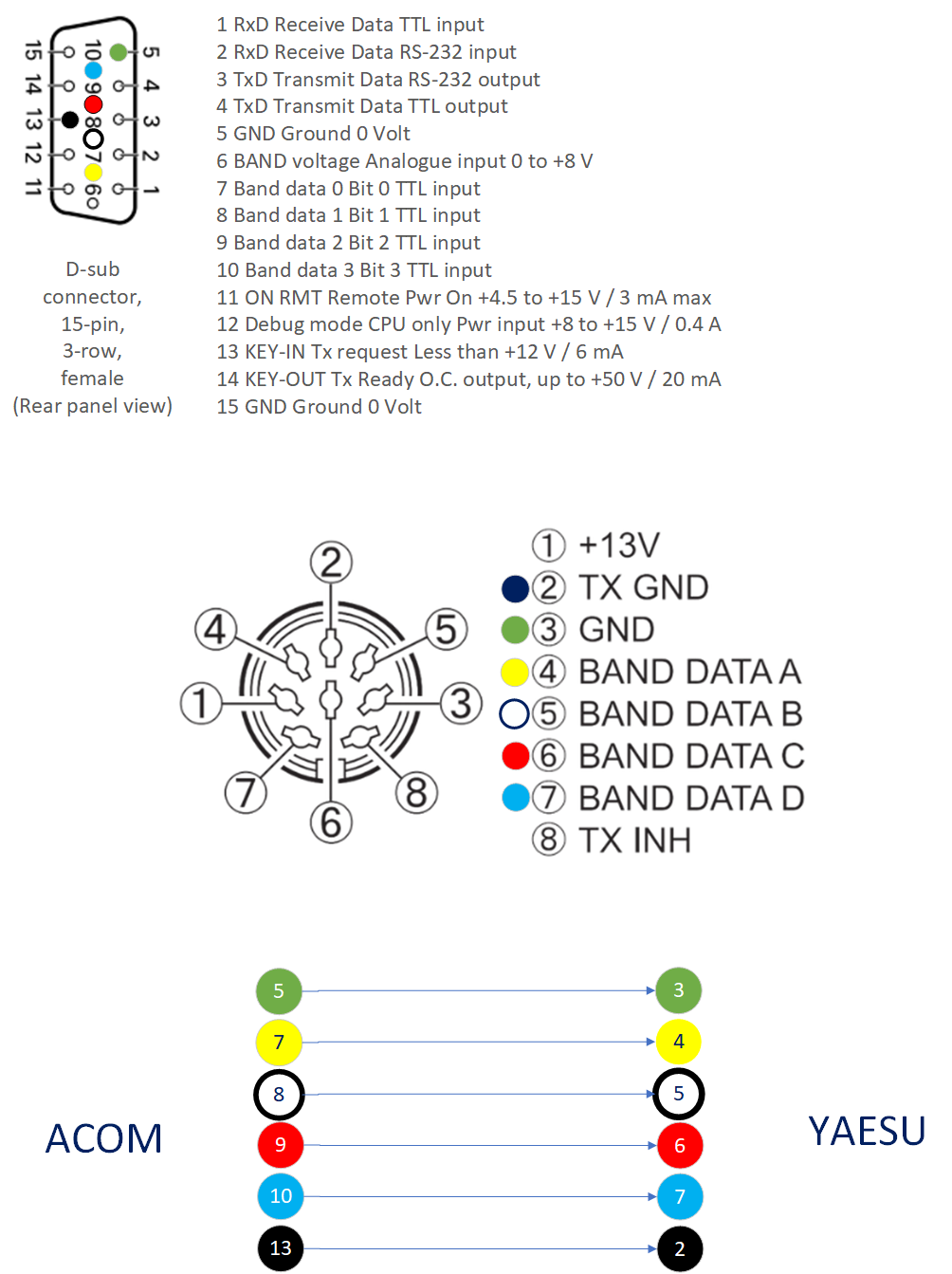
| Acom 15-way D-sub | Signal | Yaesu 8-pin DIN |
|---|---|---|
| 5 | Ground | 3 (GND) |
| 7 | Band data 0 | 4 (Band data A) |
| 8 | Band data 1 | 5 (Band data B) |
| 9 | Band data 2 | 6 (Band data C) |
| 10 | Band data 3 | 7 (Band data D) |
| 13 | KEY-IN (Tx request) | 2 (TX GND) |
The Acom's KEY-IN is rated for less than +12 V at 6 mA, so all the radio has to do is pull it to ground. Connect the cable screen to ground at one end only.
The cable I used is 5-core screened 22 AWG 2547, available here.
Yaesu FTDX-10 and other Yaesu radios: a simple PTT cable
If all you need is to key the amplifier, this is the easy one. The diagram shows an FTDX-10 connected to an Acom 700S with a Yaesu SCU-28 cable from the radio's ACC socket. The other end goes to a phono plug that plugs into the amp's KEY IN socket.
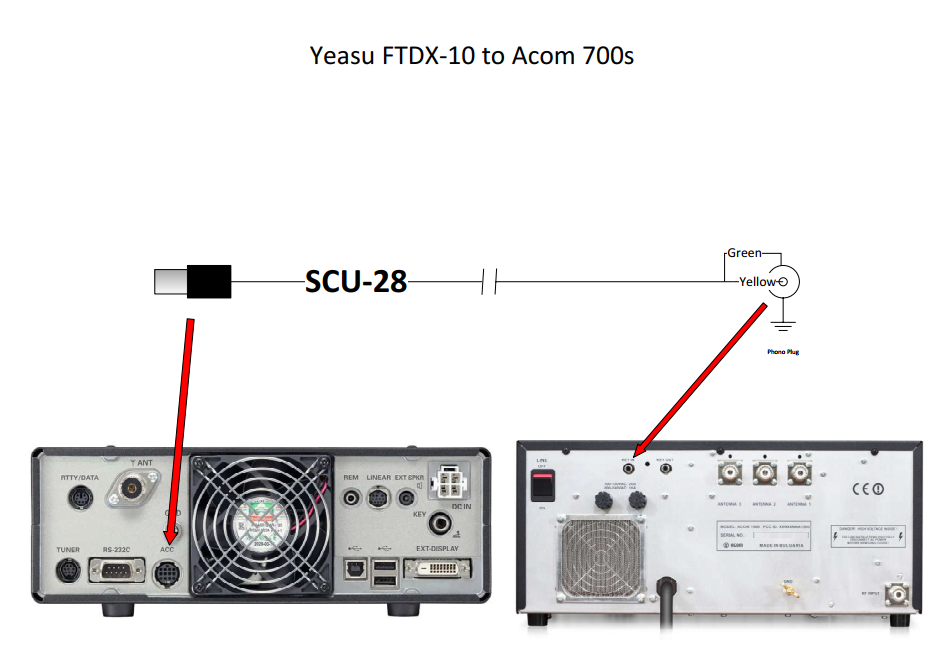
The thing to watch is the current limit on the radio's keying output. Don't exceed it on the FT-450, FT-450D, FT-950, FTDX-10 or FTDX-1200. The Acom's KEY-IN only draws a few milliamps (6 mA on the 1200S), but check your radio's limit before you hang anything else on the same line.
Icom to Acom: band data and PTT
The Acom end is a 15-way D-sub. The Icom end is two connectors: an 8-pin DIN (ACC1) for PTT and a 3.5 mm mono jack plug for the data connection.
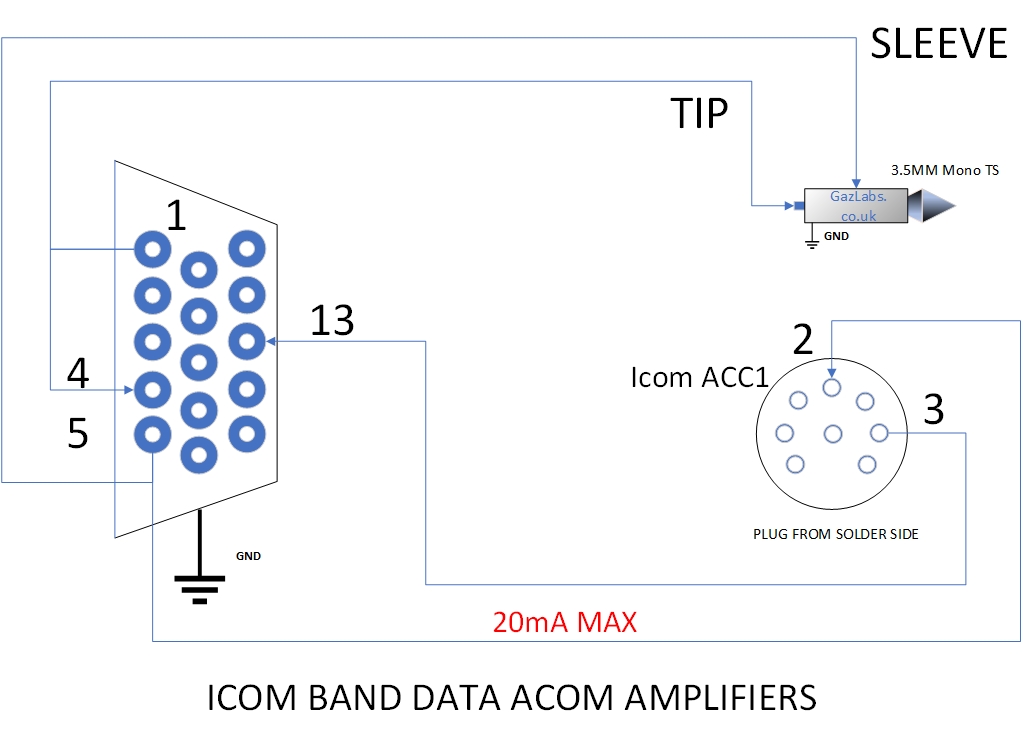
| Acom 15-way D-sub | Goes to |
|---|---|
| 13 (KEY-IN) | Icom ACC1 pin 3 (PTT) |
| 5 (Ground) | Icom ACC1 pin 2 (ground), and the sleeve of the 3.5 mm plug |
| 1 and 4 (data in and out) | Tip of the 3.5 mm mono plug |
Keep the PTT line to 20 mA maximum. Pins 1 and 4 are joined at the tip so the amplifier can read the radio over a single data wire.
Flex Radio FLEX-ACC-8P-TRS microphone cable
A small cable for the Flex 8-pin microphone socket, with a 3.5 mm TRS plug for the mic and a phono plug for PTT.
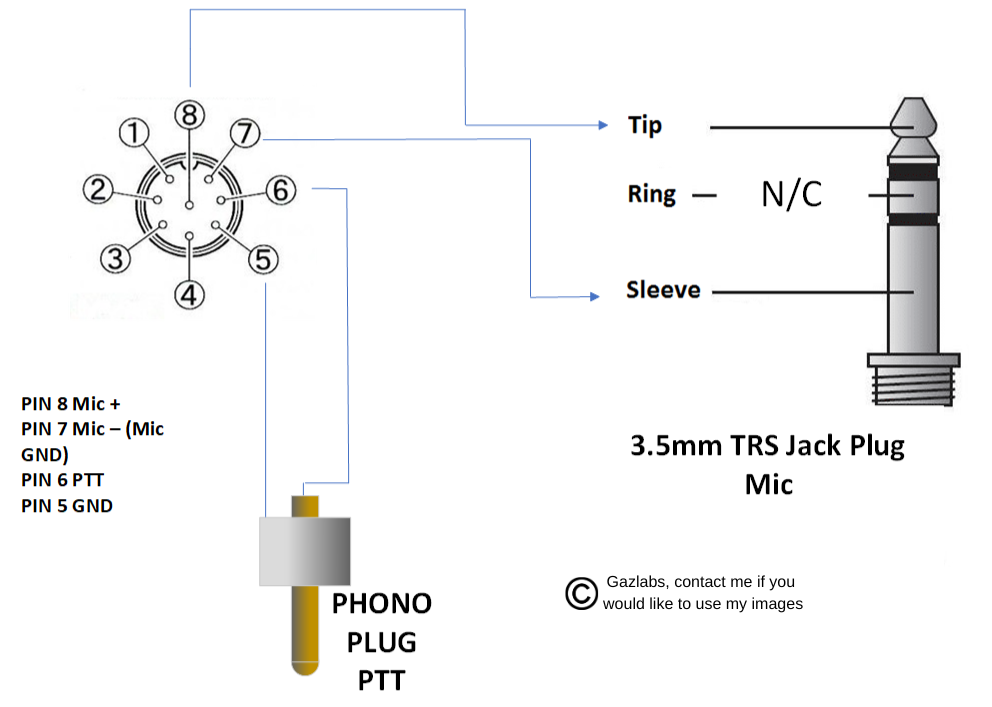
| Flex 8-pin pin | Signal | Goes to |
|---|---|---|
| 8 | Mic + | Tip of the 3.5 mm TRS plug |
| 7 | Mic – (mic ground) | Sleeve of the 3.5 mm TRS plug |
| 6 | PTT | Centre of the phono plug |
| 5 | Ground | Outer (sleeve) of the phono plug |
| – | Not used | Ring of the 3.5 mm TRS plug |
Build and test checklist
- Check the pinouts against the manuals for both the radio and the amplifier before you pick up the soldering iron.
- Use screened cable and keep the control leads short and away from the antenna feed.
- Test the PTT with a multimeter before connecting the amp. The radio should only close the line when it's transmitting.
- Check the keying voltage and current against the radio's limits.
- Do your first transmit into a dummy load at low power with the amp in standby, then step the power up.
Quick question
Do I need band data as well as PTT? No, PTT alone will key the amplifier. Band data just saves you changing the amp's band by hand.
The diagrams are drawn by me in Visio. If you'd like to use them, get in touch. Use at your own risk, as always.